
The Ultimate Honda
9 years ago
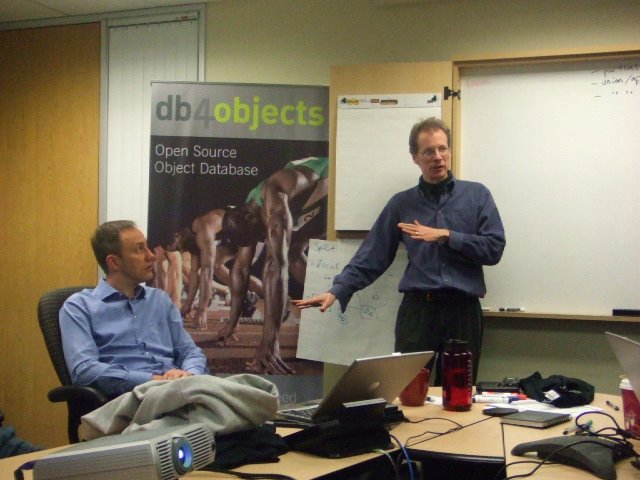
I am hosting a panel on Objects and Databases at OOPSLA in Portland this year, on Oct 24th. Here is the working abstract:
Java and C# have brought Object Oriented Programming to the masses, yet programmers continue to struggle with persistent storage of objects. Juggling object persistence with requirements for simplicity, flexibility, maintainability, transparency, scalability and five-nines uptime can rattle even the most hardened architect. Solutions are still evolving rapidly and increasing in complexity, with no end in sight. At the same time developers continue to experiment with alternatives, both old and new.
This panel will discuss the state of the union between objects and databases, as seen from the trenches, with focus on current trends in object-oriented databases and object-relational mapping.
Panelists include:
* Robert Greene, Versant
* Patrick Linskey, BEA
* Erik Meijer, Microsoft
* Ken Rugg, Progress Software
* Craig Russell, Sun Microsystems
* Bob Walker, GemStone Systems
* Christof Wittig, DB4objects
It should be a lively and interesting discussion. I hope some of you will consider attending. I may add a customer representative or two.



| Google Query | Time |
| shell-command csh directory-of-shell | 3:22:15 PM |
| shell-command csh directory | 3:22:21 PM |
| shell directory-of-command | 3:23:09 PM |
| shell directory-of-the-command | 3:23:41 PM |
| sh unix | 3:28:06 PM |
| sh script | 3:28:29 PM |
| csh "path to command" | 3:29:32 PM |
| csh "path to the command" | 3:29:57 PM |
| csh "path of the command" | 3:31:36 PM |
| csh "path of the current" | 3:32:04 PM |
| csh "path of the current command" | 3:32:18 PM |
| csh "path of the current shell" | 3:32:24 PM |
| csh "path of the current batch" | 3:32:32 PM |
| csh "path of current command" | 3:32:39 PM |
| sh path command that is running | 3:32:52 PM |
| unix path command "that is running" | 3:33:14 PM |
| unix path "file that is running" | 3:33:36 PM |
| csh "file that is running" | 3:34:39 PM |
| bash "file that is running" | 3:35:50 PM |
| shell directory-of-the-command | 3:36:12 PM |
| csh jar files | 3:36:48 PM |
| csh locate-jar files | 3:39:43 PM |
| csh locate-jar | 3:39:47 PM |
| csh find-jar | 3:39:51 PM |
| csh find-jar same-directory | 3:40:07 PM |
| csh jar same-directory | 3:40:10 PM |
| bin/sh same-directory | 3:41:20 PM |
| unix csh | 3:44:02 PM |
| unix csh reference | 3:44:14 PM |
| directory-where the command | 3:51:51 PM |
| directory-where the command csh | 3:52:02 PM |
| csh "path the current command" | 3:53:51 PM |
| csh "path to the current command" | 3:54:00 PM |
| unix "path to the current command" | 3:54:07 PM |
| unix "path to the executing command" | 3:54:11 PM |
| unix "path to the executing" | 3:54:15 PM |
| sh "path to the executing" | 3:56:22 PM |
| path to the executing | 3:57:06 PM |
| path to the executing unix | 3:58:08 PM |
| unix current process | 4:00:16 PM |
| shell current-process | 4:00:31 PM |
| shell "path to the executing" | 4:04:19 PM |
| shell "to the executing" | 4:06:06 PM |
| shell "of the executing" | 4:06:20 PM |
| shell "path of the executing" | 4:08:49 PM |
| shell "path of the running" | 4:10:51 PM |
| shell "path of the running" unix | 4:10:58 PM |
| shell "path of the running scriopt" unix | 4:12:24 PM |
| shell "path of the running script" unix | 4:12:26 PM |
| path "running shell" | 4:15:39 PM |
| path-of "running shell" | 4:15:53 PM |
| path-of running shell | 4:16:46 PM |
| path-to running shell | 4:16:50 PM |
| path to running shell | 4:16:52 PM |
| path of running shell | 4:16:55 PM |
| path of running | 4:16:59 PM |
| java relative-to-shell | 4:17:27 PM |
| java shell same-directory | 4:17:44 PM |
| bash "running shell" | 4:18:53 PM |
| bash "path of running" | 4:19:31 PM |
| bash "path to running" | 4:19:45 PM |
| bash path to shell | 4:20:06 PM |
| bash "path to script" | 4:21:40 PM |
| bash "path of script" | 4:22:00 PM |
| script to identify it's location | 4:25:29 PM |
| $0 alias lookup path | 4:30:54 PM |
| $0 alias path | 4:33:04 PM |
| csh scripting | 4:37:57 PM |
| csh scripting first word | 4:38:22 PM |
| dirname $0 | 4:41:14 PM |
| fletcher mattox | 4:43:47 PM |
| sh shell command files if | 4:50:20 PM |
| sh shell command files "if (" | 4:51:41 PM |
| sh shell command "if (" | 4:51:52 PM |
| introduction shell | 4:52:23 PM |
| introduction shell sh | 4:52:26 PM |
| introduction shell csh | 4:53:44 PM |
| tsh | 4:54:40 PM |
| tsh shell scripting | 4:54:59 PM |
| sh shell scripting | 4:55:02 PM |
| sh builtin variables | 5:00:50 PM |
| shell standard variables | 5:01:37 PM |
| determin unix os | 5:02:18 PM |
| determine unix os | 5:02:20 PM |
| command to find unix os | 5:02:42 PM |
| command to find unix os version | 5:02:46 PM |
| command unix os version | 5:02:51 PM |
| command unix os-version | 5:03:00 PM |
| sh substring | 5:04:09 PM |
| directory of a batch file | 5:09:48 PM |
| directory "running batch file" | 5:09:56 PM |
| directory "running batch file" -pid | 5:10:29 PM |
| directory of running batch file | 5:10:58 PM |
| cmd file directory | 5:11:07 PM |
| directory "running command" cmd | 5:11:24 PM |
| directory "running command" | 5:11:28 PM |
| directory "running command" windwos | 5:11:30 PM |
| directory "running command" windows | 5:11:32 PM |
| directory "of running" command windows | 5:11:53 PM |
| command arguments batch files | 5:12:20 PM |
| dspx | 5:15:51 PM |
| dspx batch | 5:15:55 PM |
| windows batch varialbes | 5:16:17 PM |
| windows batch variables | 5:16:19 PM |
| windows batch variables "~" | 5:16:32 PM |
| windows batch no echo off | 5:19:49 PM |
| bash variable substring replacement | 8:11:44 PM |
| windows shell command | 8:19:06 PM |
| location of batch file | 8:27:11 PM |
| location of current batch file | 8:27:25 PM |
| location of running batch file | 8:27:28 PM |
| directory "running batch file" | 8:27:35 PM |
| directory "running batch file" -pid | 8:27:42 PM |
| find directory "running batch file" -pid | 8:31:29 PM |
I want to distribute some Java software in a way that is easy to use. The software depends upon some libraries, so I need to set the class path before running Java. I created a simple command ile (for Unix and Windows) to launch the application. I assume the libraries are in the same irectory as the command file, but had a hard time finding out what directory the command file is in. I didn't want the user to have to set up a path or do anything to install: just expand a ZIP file and go.
Eventually I found an answer. Here are the two versions. I have tried it on debian, windows and cygwin. These commands run the class foo.Foo from the foo.Jar, which also uses lib/mail.jar.
-----------------foo.bat for Windows -------------
@ECHO OFF---------------------------------------------------
set dir=%~dp0%
java -cp "%dir%/foo.jar;%dir%/lib/mail.jar" foo.Foo %1
I out to know what %~dp0% means, but I have to admit I don't. I'll look it up later.
------------------ foo.sh for Unix -------------------
#!/bin/bash---------------------------------------------------------
dir=`dirname $0`
os=`uname`
if test ${os:0:6} = "CYGWIN"
then
if test ${dir:1:8} = "cygdrive"
then
dir="${dir:10:1}:/${dir:12}"
fi
java -cp "$dir/foo.jar;$dir/lib/mail.jar" foo.Foo $*
else
java -cp "$dir/foo.jar:$dir/lib/mail.jar" foo.Foo $*
fi
Make sure the line endings are correct, and the file has execute access.
Note that java has two kinds of separators for the class path depending on whether it is unix or windows. This by itself is pretty annoying, but it gets worse: when you run cygwin it is a unix OS but it uses the windows separator. Since dirname can return \cygdrive\c\... but this is not understood by Java, I have to change it to c:\... But Java seems to understand / or \ as the separator, which is good. Lots of fun!
I am not sure that these will work everywhere. But it is a start.
They work in these cases:

 Posts
All Comments
Posts
All Comments


